Don’t Waste Months on AI Voice Changers Before Understanding it
- April 4, 2026
- Prachi Gupta
- AI Tools
I spent three months doing the same thing over and over, expecting different results. That’s not innovation. That’s a rut.
Table of Contents
ToggleI’d open 11 Labs, pick a voice—let’s say a deep, gravelly character voice—paste my script, hit generate, and wait. The audio would come back. It would sound… flat. Generic. Nothing like what I heard in my head. So I’d try the same voice again. Different script, same settings. Same problem. I blamed the tool.
The tool wasn’t the problem. I was.
This realisation came while building audio for multiple projects. I’d generated hundreds of voice samples for character narration, and almost all of them sounded like a processing algorithm, not a person. That’s when I stopped blaming the software and started asking: What am I actually telling it to do?
The Myth That Broke My Workflow
There’s a lie that lives in every TikTok reel about AI voice changers: you paste. You click. Magic happens. Done.
That’s not how any of this works.
The real friction starts the moment you realise that slapping a script into a voice modulation software and hitting “generate” is just the first 5% of the job. What actually matters is tone. Character consistency. Pitch. The voice modulation has to match not just the script—it has to match the emotional weight of what the character is doing in that moment.
I learned this the hard way. I was using 11 Labs with its credit system, scrolling through hundreds of voice options. But I kept picking voices and applying the same settings. The same approach. The same expectations. The audio kept coming back soulless.
Then I started experimenting across my projects. Different voice. Different tone preset. Different pitch adjustment. Suddenly, the character sounded like an actual person instead of a processing algorithm. That’s when I realised: the AI voice changer itself isn’t where the work is. The work is in knowing your character well enough to tell the AI what it should sound like.
I’ve tested this method across dozens of projects. The pattern holds every time.
Related: Before You Use AI-Generated Images, Read This
How I Actually Use This Now
My real-time workflow uses two tools: 11 Labs and Google Cloud Text-to-Speech. They’re not interchangeable. They’re complementary.
11 Labs is where I spend most of my time. The credit system is straightforward—you get a pool of credits, and you burn through them with generation. What makes it useful is the voice variety. There are enough options that you can usually find something close to what you need, then adjust.
![ElevenLabs dashboard showing a script with emotional tags like [whisper] and stability sliders set for creative character voice modulation.](https://bitwisereviews.com/wp-content/uploads/2026/04/Screenshot-2026-04-04-at-10.18.50-PM-768x480.png)
[ Screenshot showing 11 Labs voice selection panel with tone and pitch settings]
The settings matter here. I’m not just clicking “Generate Voice.” I’m setting tone, modulation depth, and pitch variance. Those three variables change everything.
According to 11 Labs’ documentation on voice parameters, tone controls emotional warmth, modulation depth handles variation, and pitch variance prevents robotic monotone. I use all three intentionally. For a gravelly antagonist character, I set the tone lower (more serious), modulation higher (more natural variation), and pitch variance at 15+ to avoid sounding synthetic.
Google Cloud Text-to-Speech is the secondary tool. Also, multiple voice varieties. I use it for comparison, mainly. Sometimes it handles a specific character better. Sometimes the processing sounds cleaner. But switching between them means re-learning slight UI differences, different credit structures, and different naming conventions for the same basic settings.
The real test is what you hear.
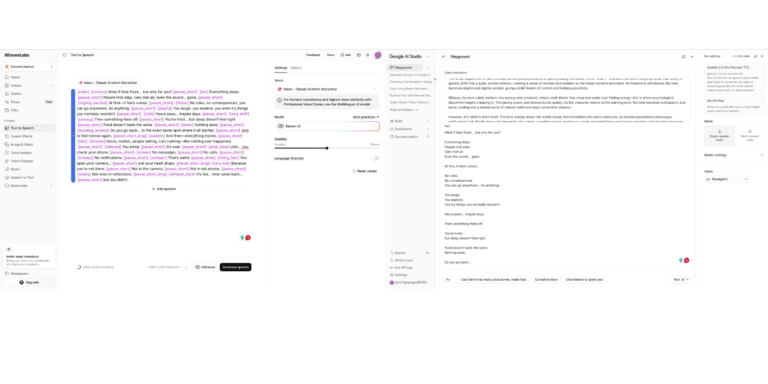
[The UI Friction. ElevenLabs (Left) uses a tag-based emotional system like [whisper] and [rising_fear]. Google AI Studio (Right) requires a cleaner, more instructional approach. Mastering both is what dropped my production time from 5 hours to 45 minutes.]
The Time Math
I’m running on free credits right now. That means I’m limited. A hundred generations here, a few hundred there. Some days, I hit the ceiling. That’s actually useful—it forces you to be intentional instead of just spray-and-pray with audio generation.
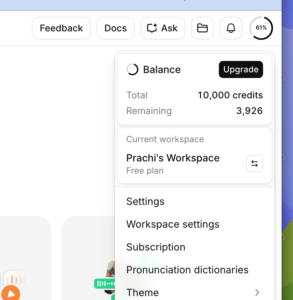
The bigger time cost is the learning curve. When you’re juggling 11 Labs and Google Audio simultaneously, you’re essentially learning two different interfaces for the same fundamental task: voice modulation. Once you know them, the friction drops. You get faster. You stop making stupid mistakes. But that ramp is real. Plan for it.
Early projects took 4-5 hours per piece for voice work. Now it’s 45 minutes. That’s not because the tools got faster. It’s because I stopped treating voice modulation like magic and started treating it like a skill.
Read More: Which AI Plagiarism Checker Works? Truth About Accuracy
What The Reels Get Wrong
Every week, I see another influencer dropping a compilation video. “Try these 5 AI voice changers.” They show quick clips. Every voice sounds perfect. Every result is instant and flawless.
Then you try it yourself.
The credit economics don’t match the hype. Most of these tools come with starter credits that are criminally low. Enough for three, maybe five generations before you’re watching ads or opening your wallet. The voices they show in the videos are cherry-picked. The ones that actually sound good. They don’t show you the seventeen failed attempts, the voices that sounded robotic, the pitches that were off by a half-step.
And the easiness thing? Pure marketing. Nothing in voice modulation software is easy if you actually want results that don’t sound like a voiceover from a 2009 GPS device.
Also Read: How to Write ChatGPT Prompts Effectively (Complete Guide 2026)
The Only Real Lesson
Stop using one tool like it’s gospel. Stop expecting the audio to come out perfect the first time. Stop thinking that because the software is “AI,” it somehow reads your mind about what your character should sound like.
It doesn’t. You have to tell it.
Experiment. Try different voices. Adjust the tone. Change the pitch. Listen to how small variations in modulation create different characters. That’s not extra work—that’s the actual work. That’s what separates audio that sounds like audio AI from audio that sounds like a person.
Once you accept that, voice modulation becomes less like magic and more like craft. And craft is something you can actually get good at.
Tools & Resources
11 Labs Voice Settings Documentation — Technical reference for tone, modulation depth, and pitch parameters
Google Cloud Text-to-Speech Specs — Voice quality, encoding options, and real-time audio settings